Quads Lab
Free & Open Source
Python 3.9+
No API Key Required
Claude Usage Stager
Take control of your Claude Code usage windows.
Schedule automatic CLI pings so your 5-hour window starts exactly when you need it. No daemon, no API key — just your existing CLI auth and a 2-second scheduled task that runs and exits.
Python 3.9+ · MIT License · Windows, macOS, Linux
The Problem
Claude Code has rolling 5-hour usage windows that begin when first accessed. Unscheduled window starts mean peak availability may not correspond with active working sessions, resulting in wasted allocation during inactive periods.
The Solution
cus schedules OS-native tasks to ping claude -p "hi" at times you choose. No daemon, no API key — just your existing CLI auth and a 2-second scheduled task that runs and exits.
Quick Start
Two commands. That's it.
Terminal
$ git clone https://github.com/HardHeadHackerHead/claude-usage-stager.git
$ cd claude-usage-stager
$ pip install .
$ cus # Interactive menu
Prerequisites: Python 3.9+ and Claude CLI installed and authenticated
How It Works
Four steps to perfectly staged usage windows.
Step 1
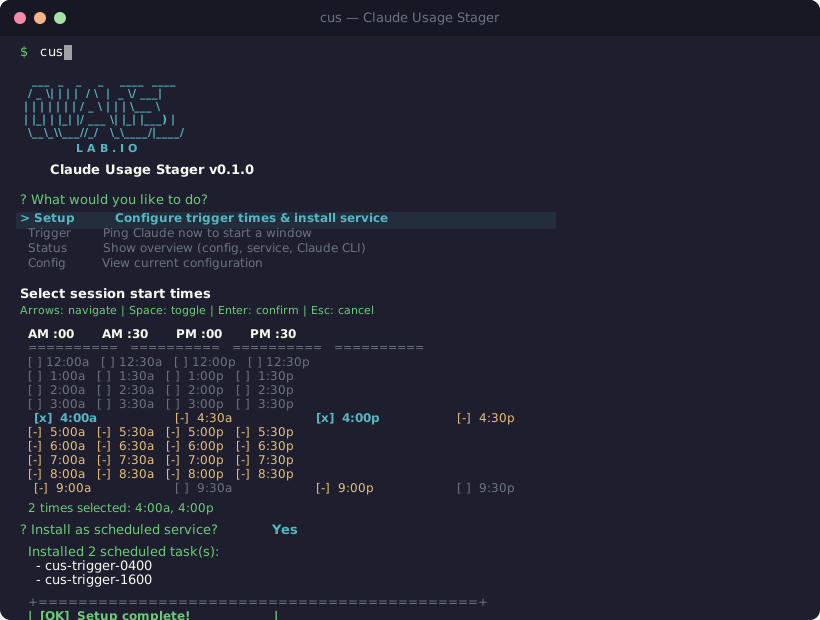
Pick your times
cus setup lets you choose when your windows should start with a visual time picker.
Step 2
OS schedules it
Native scheduled tasks — no daemon, no polling, no battery drain.
Step 3
Trigger runs
Executes claude -p "hi" — a 2-second ping that starts your usage window.
Step 4
Window is staged
Your 5-hour window begins exactly when you planned. Every day, automatically.
All Commands
cusInteractive menu — pick any actioncus setupTime picker + service installcus setup --times 04:00,16:00 --installNon-interactive mode for scriptingcus triggerPing Claude now to start a windowcus trigger --dry-runPreview without executingcus statusOverview of config, service, and Claude CLIcus configView current configurationcus config set <key> <val>Update a config valuecus config resetReset to defaultscus service installRegister OS scheduled taskscus service uninstallRemove all scheduled taskscus service statusCheck which tasks are installedcus logView recent log entriesCross-Platform Support
Native OS schedulers on every platform. No root or elevation required.
Windows
Task Scheduler (schtasks)
One task per time
macOS
launchd (launchctl)
~/Library/LaunchAgents/com.cus.trigger-HHMM.plist
Linux
systemd user timers
~/.config/systemd/user/cus-trigger-HHMM.{timer,service}
Status Dashboard
See everything at a glance with cus status.
$ cus status
Claude Usage Stager
Version: 0.1.0
Enabled: True
Trigger times: 04:00, 16:00
Claude CLI: C:\nvm4w\nodejs\claude.CMD
Service: 2/2 tasks installed
[OK] cus-trigger-0400 (04:00)
[OK] cus-trigger-1600 (16:00)
Last log entry: 2026-03-12 08:00:01 [INFO] Ping succeeded in 2.3s
Stop wasting your usage windows
Free, open source, and ready to use. Stage your Claude Code sessions today.